Thomas A.Edison CTE HS
In unit 1 we were Introduced html + css and how to use it along with digital information. For the html part we learned tags and what they do, how to insert images using html, how to start an html webpages code, how to hyperlink, how to make list (unordered and ordered), etc.For the CSS part we learned how exactly to use CSS, the different things we can do with CSS, how to link a CSS stylesheet to our html document, etc. For the digital information part we learned about binary, patterns, RGB, lossy compression, lossless compression, intellectual property,etc.
In this unit we learned the basics of html. We learned what exactly tags were and how to use them. Html is the coding language that allows us create the structure and content of out webpage. Html tags tells the computer what we are doing when the tags are used. The opening tag consist of 2 angle brackets and what we are trying to do. For example < p > tells the computer this is going to be the start of a paragraph. The closing tag consists of 2 angle brackets, what were trying to do and a slash. For example < /p > tells the computer this is the end of the paragraph.
CSS stands for cascading style sheets. This is used to customize our website. Using css we can change the background color of our page, text size, font, etc. There are 3 different ways to use css. Internal CSS, In line CSS, and external CSS. Internal CSS is when you use the style attribute in the head of an html document. The style attribute is the html tag used to start CSS in an html document. In line css is when in the html tag you use style to then change the look of a certain thing in your website. External CSS is CSS used in a style sheet that you would link to you html document so that the CSS from the stylesheet will appear on your website.

This is an example of inline css.
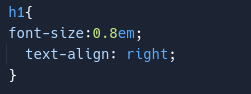
This is an example of external css.
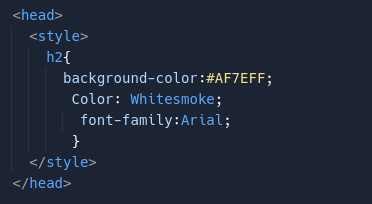
This is an example of internal css.
In digital information we learned a lot about numbers in code. One of the main things we learned was binary numbers. For example we learned how to convert binary numbers to decimal numbers. An example is if the binary is 1001 the decimal number is 9. Another major thing we learned was bits and bytes and when they are on and off. For example if the binary is 1001 2 bits are on (when they are one it is on) and 2 are off (when they are zero its off). 8 bits are equal to a byte, 4 bits are equal to a nibble, and a bit is the smallest data. If there is a set amount of bits and the computer exceeds that then overflow will happen. For example if the set amount of bits are 4 then 10011 would cause overflow. Depending on the decimal number the computer will either round up or down to get a binary number. The third major thing we learned is sampling, analog data, and digital data. All 3 of these are used when it comes to data. Sampling is creating a digital representation of analog data by measuring and intervals called samples. Analog data is data with value that continuously changes over time. Digital data is data that changes through a infinite set of possible values. When using only 2 bit for color there were only 2 options black or white. When you use 3 bits you can start to make red, blue, or green. The last major thing we learned lossy and lossless compression along with intellectual property. Lossey is a process that reduced the amount of bits used and that information is thrown away. This process is not reversible. Lossless is a process where the amount of bits is reduced but the information isn’t thrown away and the process is reversible. Intellectual property allows people to have the right to their art.
In this unit we learned about the internet and how it flows together.The internet was created by Vint Cerf and Bob Khan in 1970. The internet is a worldwide system that transmits data between devices. The internet has computing networks that have paths in which they are sent. Bandwidth is what is referred to as the rate of transfer of data. Systems will have a set of rules called a protocol and these connect with you Ip address which are unique numbers assigned to you device. The Ip address protocol assigns these numbers to connected devices. Router will help forward this data and they have fault tolerance and redundancy which are important to have because systems will fail unexpectedly. Data sent across a network is called a packet and the datastream is the packets of information passed through the internet. When sending larger messages the packets are divided and can be ut of order or not there at all for the packet meta data helps reassemble it.
Unit 3 was the introduction to app design. We learned what a user interface was, what are inputs and output, programs that are triggered by an event, and sequential programming. The user interface is what the user sees and interacts with. This is a crucial part in app design because it’s what makes the app the app. Inputs and outputs are also very important parts of app design because there another big thing the user interact with. For example if you thumbs up a photo on instagram thats the input but the output is the number of likes going up. Inputs and output can do the small and big things and our app and make a big difference. Programs that are triggered by an event are the things that make our app fun. Triggered my an event means when the user does something. For example if the user clicks on the logo of the app a heart my appear. The heart appearing was triggered by the click on the logo. Sequential programming is when events happen in the order we code it. This is good for knowing how to code certain things and where that goes in our code so that it works well.
In this unit we went more into detail about Javascript. We learned about variables, conditionals, strings,boolean expression/ values. ,comparison operators, logical operators, functions, and function call. This is very important because it programs our app and makes it actually function. Variables hold information for our program. Conditionals are what happens when are statement is either true or false. Strings are used for text in variables. Boolean expressions and values are statements/values that are either true or false.Comparison operators are used to compare things and will then decided if a statement is true of false. Logical operators are also used to decide if a statement is true or false. Functions are used to reduce repeated code, and variables store information for the user to use. Function calls are used in out code to use what is in the function without writing all the code in it.